






Short answer: keep your keyboard and mouse at about elbow height, close to your body, with your wrists straight and your shoulders relaxed. Put the mouse right next to the keyboard so you're not reaching out to the side. Small adjustments like these reduce the strain that builds up over a long day at a desk.
Your gear matters too, but setup comes first. Here's a simple way to get it right.
This is general guidance for a more comfortable desk. If you have ongoing pain, see a physiotherapist or doctor.
How high should your keyboard be?
Sit with your shoulders relaxed and your upper arms hanging naturally by your sides. Bend your elbows to roughly a right angle. Your keyboard should sit at about that height, so your forearms are close to level and your wrists don't bend up or down.
-
Desk too high? Raise your chair and use a footrest if your feet no longer sit flat.
-
Desk too low? Lower your chair, or raise the desk if it's adjustable.
How far away should your keyboard be?
Close enough that your elbows stay near your sides. If you're reaching forward to type, your shoulders end up doing work they shouldn't. Pull the keyboard towards you and centre it on the keys you use most. For most people, that means centring the main letter keys, not the whole keyboard, in front of your body.
Should your keyboard be tilted?
Many keyboards have flip-out feet, but tilting the back up can bend your wrists upward. Use the lowest setting that's comfortable, and aim for straight wrists. Lower-profile keyboards help here because your hands start closer to the desk.
If you like a slim, low setup, Keychron's ultra-slim B1 Pro and full-size B6 Pro keep your hands low. The B6 Pro uses a scissor mechanism and concave keycaps.

Where should your mouse go?
Right beside the keyboard, at the same height. The further out the mouse sits, the more your arm swings out from your shoulder, and that's where shoulder ache often starts.
Two things make a big difference:
-
A narrower keyboard: a full-size board's number pad pushes your mouse further right. A TKL, 75% or 96% layout lets it sit closer. (See our guide to keyboard sizes.)
-
Moving from the elbow, not the wrist: let your forearm do the work rather than flicking your wrist side to side.
What about a vertical or ergonomic mouse?
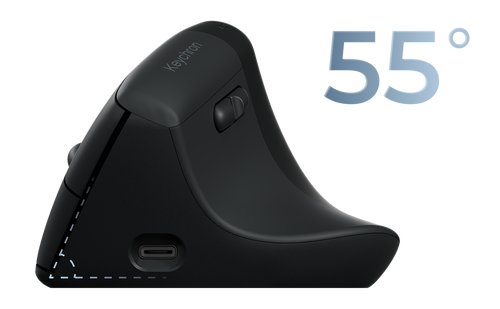
A standard mouse holds your palm flat, which twists your forearm. A vertical mouse tilts your hand into a handshake position instead. Some people find this much more comfortable over long days, especially if their wrist or forearm gets sore.
-
Keychron M5 & Keychron BM27: a vertical ergonomic mouse that Keychron describes as promoting a natural handshake position for all-day comfort.
-
Keychron M6: a more traditional shape, with a pronounced curve on top and a thumb rest on the side to fit the contour of your palm.
Vertical mice take a few days to get used to, so give it a week before deciding.
Does the mouse weight matter?
A lighter mouse takes less effort to move and stop, which adds up over thousands of movements a day. Keychron's BM22 weighs 76 g with a symmetrical shape, and the BM24 weighs 81 g with an asymmetrical shape for right-handed use.
Is a keyboard and mouse combo worth it?
For a simple work setup, a combo means a matching keyboard and mouse that are designed to sit together on the desk. Keychron's combos pair a slim keyboard with a quiet mouse:
-
B6 Pro + BM24 (full-size keyboard)
-
B33 + BM25 (80% TKL keyboard with a scissor mechanism)
The BM24 and BM25 mice in these combos use all-silent switches, which helps in shared offices.
The rest of the desk
-
Screen: top of the screen at or slightly below eye level, about an arm's length away.
-
Chair: feet flat, knees roughly level with your hips, lower back supported.
-
Laptop users: raise the laptop to eye level and use a separate keyboard and mouse.
-
Breaks: stand up and move every 30 to 60 minutes. No setup replaces moving.
Quick checklist
-
Elbows at about 90 degrees, shoulders relaxed.
-
Keyboard close, letter keys centred in front of you.
-
Wrists straight, not bent up or down.
-
Mouse right next to the keyboard, at the same height.
-
Screen at eye level, an arm's length away.
-
Regular breaks.
Frequently asked questions
Should my wrists rest on the desk while typing?
Ideally, your wrists float while you type and rest during pauses. Resting your wrists hard on a sharp desk edge while typing can add pressure.
Is a vertical mouse better for wrist pain?
Many people find a vertical mouse more comfortable because it reduces forearm twist. It doesn't
suit everyone, so it's worth trying one for a week.
Does keyboard size affect shoulder strain?
It can. A narrower keyboard lets your mouse sit closer to your body, so your arm doesn't reach as far out to the side.
How high should my desk be?
High enough that your forearms are close to level with your elbows at roughly 90 degrees while you type, with your shoulders relaxed.