

If you have been searching for the best wireless mechanical keyboard for gaming, you have probably already noticed that the options are overwhelming. There are dozens of brands, hundreds of models, and an endless stream of spec sheets that all seem to say the same thing. The reality is that most of them are not built for serious gaming, and a few of them genuinely are.
This guide cuts through the noise. We will cover what actually matters when choosing a gaming wireless mechanical keyboard, why wireless no longer means compromise, and what NZ gamers should be looking for in 2026.
Why Wireless Mechanical Keyboards Are Now Viable for Gaming
For years, the gaming community treated wireless keyboards with scepticism. The concern was latency, that tiny delay between pressing a key and the action registering on screen. In competitive gaming, even a few milliseconds can matter, which is why wired connections were considered the only serious option.
That has changed significantly. Modern wireless technology, particularly 2.4 GHz connections, has effectively closed the gap with wired performance. Today's best wireless gaming keyboards offer response times that are functionally identical to their wired counterparts in real world use. The idea that wireless equals lag is largely outdated.
What changed? A few things. First, 2.4 GHz wireless technology matured. Dedicated USB receivers now communicate with keyboards at polling rates of 1000 Hz or higher, meaning the keyboard is reporting its position to your computer 1,000 times per second. Some newer models push this even further with 4K and 8K polling rates. Second, switch technology improved. The mechanical switches inside today's gaming keyboards are faster and more consistent than ever, meaning the physical actuation is no longer a bottleneck either.
The result is that a fast response wireless keyboard in 2026 is genuinely competitive, not just for casual gaming, but for serious play.

What to Look for in a Gaming Wireless Mechanical Keyboard
Before getting into specific recommendations, it is worth understanding the specs that actually matter. A lot of marketing in this space is designed to impress rather than inform, so here is what NZ gamers should actually pay attention to.
Connection Type: 2.4 GHz vs Bluetooth
This is the most important wireless decision you will make. There are two main wireless protocols used in keyboards today, 2.4 GHz and Bluetooth, and they serve different purposes.
2.4 GHz is the one you want for gaming. It uses a dedicated USB receiver that communicates directly with the keyboard on a low latency, high stability channel. The connection is fast, consistent, and does not drop. This is the connection type that makes wireless gaming keyboards genuinely competitive with wired options.
Bluetooth is convenient but not ideal for fast paced gaming. It is great for switching between devices, your PC, laptop, and phone, but the latency is measurably higher than 2.4 GHz and the connection can be less stable in environments with a lot of wireless interference. Most quality gaming keyboards support both, which gives you the best of both worlds. 2.4 GHz when you are gaming, Bluetooth when you are working on a laptop or tablet.
The best wireless mechanical keyboards for gaming support both protocols and let you switch between them with a dedicated button.
Polling Rate
Polling rate refers to how often your keyboard reports its status to your computer, measured in Hz. A 1000 Hz polling rate means the keyboard checks in 1,000 times per second. Higher polling rates mean the latency is hardly noticeable even in competitive games, delivering optimal performance. more responsive input, theoretically.
Higher polling rates including 8000 Hz start to matter at matter is at the very top end of competitive play, where consistency and precision are everything. If you are a casual to mid level gamer, 1000 Hz to 4000 Hz is the floor you want and anything above is a bonus.
Switch Type
The switch is the mechanical component under each key that registers your keypress. For gaming, you generally want one of two types.
Linear switches have a smooth, consistent keystroke with no tactile bump or audible click. They are fast and quiet, which makes them the most popular choice for gaming. Red switches are the classic example, light actuation force, no bump, straight down and back up.
Tactile switches have a small bump mid keystroke that gives you physical feedback when the key has registered. They are popular for typing but some gamers prefer them for the added confirmation. Brown switches are the most common tactile option.
For pure gaming performance, linear switches are generally the recommendation. That said, the best switch is ultimately subjective. What matters more is that the switch is consistent, well built, and from a reputable manufacturer.
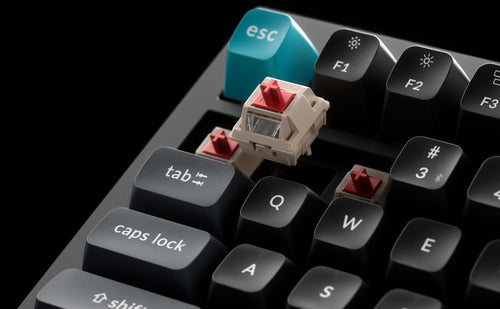
Hot swappable keyboards, where you can pull out and replace switches without soldering, are worth considering if you want flexibility to experiment without buying a whole new keyboard.
Battery Life
One of the practical considerations that often gets overlooked. A wireless keyboard that dies mid session is worse than useless. Look for keyboards with a minimum of two to three weeks of battery life under regular use with backlighting on, and longer without. Some keyboards offer months of life with RGB lighting turned off.
USB-C charging is now standard on quality keyboards and worth confirming before you buy. The older micro-USB connectors are increasingly hard to justify in 2026.
Build Quality
Gaming keyboards take a beating. If you are investing serious money in a wireless mechanical keyboard, the build quality should match. Full aluminium frames are the premium option. They are heavier but virtually indestructible and dampen vibration significantly, which improves the feel and sound of every keypress. Polycarbonate frames are lighter and often more affordable but flex slightly under pressure.
Gasket mounted designs, where the internal switch plate is suspended on silicone or foam gaskets rather than screwed directly into the case, provide a softer, bouncier typing feel that many gamers and typists prefer. This is a feature you will find on higher end boards and it makes a noticeable difference.
Low Latency Wireless Keyboards: Separating Fact from Marketing
Every gaming keyboard brand claims low latency. Not all of them deliver it. Here is how to evaluate the claims.
The latency chain in a wireless keyboard has three main links: the switch actuation time, the firmware processing time, and the wireless transmission time. Most marketing focuses on the wireless transmission, "2.4 GHz low latency connection," without mentioning that slow firmware or a cheap switch can undermine the whole thing.
When evaluating a low latency wireless keyboard, look for the following. A 2.4 GHz connection as standard, not just Bluetooth. A 1000 Hz polling rate minimum, as some cheaper keyboards run at 125 Hz or 250 Hz which is noticeably slower. A reputable switch manufacturer, with Gateron, Cherry, and Keychron's own switches being well regarded for consistency. Active firmware development, as brands that regularly update firmware tend to optimise performance over time, not just at launch.
One thing worth noting for NZ gamers specifically: the distance between your keyboard and your PC matters more than many people realise. Most 2.4 GHz keyboards are rated for 10 metres of reliable connection, but interference from other wireless devices, routers, headsets and mice, can degrade performance. Keeping the USB receiver close to the keyboard, ideally via a short USB extension cable plugged into the front of your PC, makes a meaningful difference.
Layout: What Size Should Your Gaming Keyboard Be?
Keyboard layout is a personal decision but it affects your gaming setup in practical ways, so it is worth thinking through before you buy.
Full size (100%) includes a numpad and all function keys. It is familiar and functional but takes up significant desk space, which pushes your mouse further to the right. This is a real consideration for gamers who use wide, low sensitivity mouse movements.
Tenkeyless (TKL / 80%) removes the numpad, bringing everything closer together. This is one of the most popular gaming layouts because it keeps your mouse position comfortable without sacrificing any keys you actually use during gameplay.
75% is a compact layout that retains most keys including the function row and arrow keys but in a tighter footprint. It is a strong balance between functionality and desk space, and one of the most versatile layouts available.
65% drops the function row but keeps arrow keys. Popular with minimalists and gamers who do not use function keys during play.
For gaming specifically, TKL and 75% tend to hit the sweet spot. Enough keys to cover everything you need in game without sacrificing mouse space.

Gaming Wireless Mechanical Keyboard NZ: What Is Available Locally
For NZ gamers, buying locally matters. Importing keyboards directly from overseas means dealing with customs, longer wait times, no local warranty support, and price uncertainty when the NZD fluctuates. Having a local retailer stocking quality keyboards means same day shipping on in stock items, local warranty support, and the ability to actually talk to someone if something goes wrong.
Keychron is one of the few premium mechanical keyboard brands with a genuine NZ presence. Their range covers everything from compact 65% layouts through to full size boards, with wireless options across the lineup. The wireless models support both 2.4 GHz and Bluetooth 5.3, use quality Gateron switches, and are built to a standard that competes with keyboards costing significantly more from overseas retailers.
For NZ gamers specifically, the value proposition is strong. You are getting a premium wireless mechanical keyboard without the import risk, at a price that is competitive when you factor in shipping, customs, and currency conversion from offshore stores.
What Makes a Fast Response Wireless Keyboard in Practice
The spec sheet will tell you a keyboard has low latency. But what does that actually mean when you are in the middle of a game?
A fast response wireless keyboard should feel instantaneous. There should be no perceptible delay between pressing a key and seeing the action on screen. The connection should be stable, with no dropouts, no stuttering, and no interference from other wireless devices in your setup. The switches should actuate cleanly and consistently, with no wobble or pre travel variation between keys.
The keyboards that deliver this consistently tend to share a few characteristics. They use 2.4 GHz as the primary gaming connection. They run format 1000 to 8000 Hz polling rate. or higher. Their firmware is actively maintained. And they are built from quality components throughout, not just the switches, but the PCB, the stabilisers on larger keys like spacebar and shift, and the case dampening.
One thing experienced keyboard enthusiasts will tell you: the feel of a keyboard under your fingers affects your gameplay more than most people expect. A board that feels mushy, inconsistent, or rattly is distracting in a way that is hard to quantify but very real. Investing in a keyboard with good build quality and well tuned switches is not just an aesthetic choice. It reduces the cognitive load of the physical interface and lets you focus on the game.
Making the Decision: What Is Right for You
The best wireless mechanical keyboard for gaming is ultimately the one that fits your setup, your budget, and how you play. Here is a simple framework for making the decision.
If you play competitively and latency is your primary concern, prioritise 2.4 GHz connection, a high 1000 Hz or higher polling rate, and linear switches. Build quality matters but the connection and switch performance come first.
If you split time between gaming and work, look for a keyboard that handles both well. Wireless with Bluetooth multi device support is valuable here, and a layout like 75% or TKL gives you function keys for productivity without sacrificing mouse space for gaming.
If desk space is limited, a 65% layout frees up significant room and forces a cleaner setup. Just make sure you are comfortable with the layer based access to missing keys before committing.
If you want to buy once and buy right, invest in hot swappable switches and a quality aluminium frame. You can change the switches as your preferences evolve without replacing the whole keyboard, and the build will last years of heavy use.
Final Thoughts
Wireless gaming keyboards have crossed the threshold where the technology genuinely delivers on the promise. The latency gap with wired keyboards is effectively closed for the vast majority of gamers, the battery life is practical, and the build quality at the premium end is exceptional.
For NZ gamers, the decision is straightforward. Buying locally from a brand with genuine NZ stock means no import hassle, local support, and same day shipping on in stock models. If you have been putting off the switch to wireless because of concerns about performance, 2026 is the year those concerns are genuinely behind you.
Browse the full range of wireless mechanical keyboards available now at Keychron New Zealand and find the right fit for your setup.