

Once a keyboard properly supports macOS, with the correct modifier positions, working function keys and reliable connectivity, the next question is less about compatibility and more about fit. Mac users are not a single group. A developer working across multiple displays has different needs from someone carrying a MacBook between a home office and a café, and the right mechanical keyboard for one may be a poor fit for the other.
This guide focuses on matching Keychron’s current keyboard lineup to the way different Mac users work, including where the Keychron Q6 Max fits for anyone who wants a premium full-size layout.
Why the “Best” Keyboard for Mac Depends on What You Do
There is no single best mechanical keyboard for Mac users because “best” depends on the work being done. Someone who rarely uses a number pad may gain little from a full-size keyboard while giving up valuable desk space. Someone doing spreadsheet-heavy work may lose real efficiency without one.
The more useful question is which layout, connectivity options and typing feel suit your workflow, followed by which Keychron keyboard delivers that combination with Mac support built in.
For Everyday Typing and Multi-Device Switching: The K Max and K Ultra Ranges
Mac users who move between a MacBook, iPad and another computer will benefit from the flexible connectivity offered by the K Max and K Ultra ranges. Both provide Bluetooth multi-device pairing, low-latency 2.4 GHz wireless and wired USB-C connectivity.
The K Max range offers a practical balance of mechanical typing, wireless flexibility and QMK-based customisation. The K Ultra range adds an 8000 Hz polling rate in wired and 2.4 GHz modes, along with ZMK firmware.
Both ranges include multiple sizes and profiles, from the compact 75% K2 Ultra and tenkeyless K8 Max to full-size models such as the K10 Max, K5 Ultra and K10 Ultra. This allows Mac users to choose the layout and performance level that best suits their workflow without giving up dedicated Mac support.

![]()
![]()
![]() For a Premium Full-Size Mac Setup: Keychron Q6 Max
For a Premium Full-Size Mac Setup: Keychron Q6 Max
Mac users who regularly work with spreadsheets, finance or numerical data may prefer a permanent number pad. The Keychron Q6 Max combines a full-size 100% layout with Bluetooth, 2.4 GHz wireless and wired USB-C connectivity.
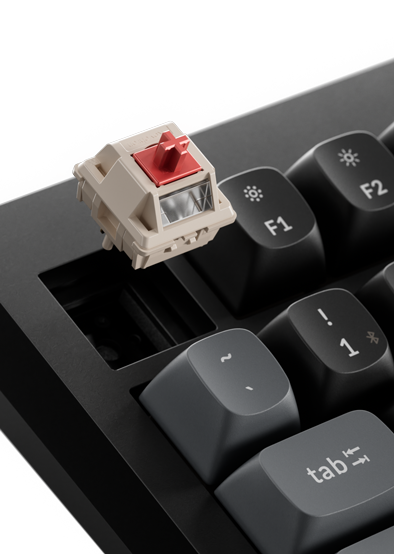
What separates the Q6 Max from more practical full-size models such as the K10 Max is its premium construction. It features a CNC-machined aluminium body, double-gasket design, hot-swappable switches and multiple layers of acoustic foam for a more substantial typing experience.
The Q6 Max also includes a physical Mac/Windows system toggle, while fully assembled versions include keycaps for both operating systems. QMK/VIA support allows users to remap keys, create macros and customise shortcuts.

For a Slim, MacBook-Like Alternative: The B Pro Series
For Mac users who prefer the slim shape and short key travel of a laptop keyboard, the B Pro series offers a lightweight, non-mechanical alternative. These keyboards do not use mechanical switches, so they feel closer to typing on a MacBook or Apple-style keyboard than a traditional Keychron mechanical keyboard.
The range includes layouts from the compact 75% B1 Pro to full-size models such as the B6 Pro. It supports Mac and Windows alongside Bluetooth, 2.4 GHz wireless and wired USB-C connectivity.
The B Pro series is best suited to users who prioritise portability, long battery life and a familiar laptop-style feel over the deeper travel and switch choice offered by a mechanical keyboard.

Switches and Feel: What Suits Mac Typing Workflows?
Switch feel is not specific to macOS. Linear switches provide a smooth keystroke, tactile switches add a noticeable bump, and clicky switches provide both tactile and audible feedback. Writers and people who type for long periods often choose linear or tactile switches, particularly in shared spaces where clicky switches may be distracting.
Hot-swappable keyboards, including the Q6 Max and selected K Max and K Ultra models, allow compatible switches to be changed without soldering. Hot-swappability can depend on the model or version, so check the individual product specifications before purchasing.
What Should a Mac-Ready Mechanical Keyboard Have?
-
A Mac modifier layout or dedicated Mac/Windows system toggle
-
Native macOS function-row support
-
Reliable Bluetooth and multi-device pairing if wireless connectivity is required
-
USB-C connectivity for wired use and charging
-
A customisation platform that works on macOS
-
A layout that matches how frequently you use a number pad
-
Hot-swappable support if you may want to change switches later
Frequently Asked Questions
Is the Keychron Q6 Max a good keyboard for Mac?
Yes. It includes a Mac/Windows system toggle, separate layouts for both operating systems and Mac keycaps with fully assembled versions. It also offers a full-size layout, tri-mode connectivity and QMK/VIA customisation.
Do I need a full-size keyboard if I use a Mac?
No. A full-size layout is most useful for people who regularly use a number pad. Compact and tenkeyless models such as the K2 Ultra and K8 Max take up less desk space while retaining the keys most people need for everyday use.
Are low-profile keyboards better for Mac users?
Not necessarily. Low-profile mechanical keyboards such as the K5 Max and K5 Ultra provide shorter key travel while retaining mechanical switches. The B Pro range is a non-mechanical alternative for users who want something closer to a MacBook-style typing experience.
Can I customise a Keychron keyboard on macOS?
Yes. Compatible Keychron keyboards can be customised using browser-based tools such as Keychron Launcher or VIA. K Max models use QMK-based customisation, while the K Ultra range uses ZMK.
Does switch type matter differently for Mac users?
No. Switch feel is not operating-system specific. However, quieter linear or tactile switches are often preferred for typing-heavy workflows, particularly in shared home or office spaces.